


Sextortion Prevention for Parents & Professionals
Protecting yourself and your child against Sextortion
Open lines of communication are the best defense against sextortion. Parents and caregivers are encouraged to have conversations with their children early on regarding their online activity.
- Be a safe space. Your children may be embarrassed, but you should have an open dialogue with them before they’re exposed to sextortion. Let them know you have their backs if something happens in the future.
- Consider limiting your children’s internet use or spot-check their phones and other devices. Keep tabs on the people your children are communicating with; this can be part of an open and ongoing conversation about what is (and isn’t) appropriate online. It also may be worth considering a rule against devices in bedrooms overnight or shutting off Wi-Fi access after a certain time.
- Review your child’s social media privacy settings. Keeping accounts private can prevent predators from gathering their personal information.
- Keep the door open. Let them know they can come to you and ask for help, and that helping will always be your top priority. If you’re the adult a child trusts with this information, you should comfort them, help them understand they have been the victim of a crime, and help them report it to law enforcement.
- Learn how to talk to your child about sending online nude images– video
Tips to help ensure online safety
- Don’t accept a friend request from anyone online you don’t know in real life.
- Don’t give any personal contact info (email or handles) to anyone you haven’t met IRL.
- If someone you don’t know asks for personally identifying information, say no.
- Never share your passwords with anyone.
- Don’t use easy to guess passwords, such as pets’ names, birth dates or anything that someone can guess by reviewing your social media profiles.
- Don’t click on links in e-mails that come from people you don’t know; doing so could compromise your device.
- Teach your teens to report threats. Though they may be stressed or embarrassed, talk to your them about online safety and encourage them to come forward when they receive a suspicious email.
- Be wary of the recording devices you bring into your home. Some low-security devices (such as baby monitors and nanny-cams) are easy to exploit.
- Assume your webcam or recording devices can be activated remotely. Never have your phone or other electronic camera devices pointed at you while undressing or in a position you would not want to share with the world.
- Cover your webcam when you’re not using it; if your webcam doesn’t have a built-in cover, use a sticker or piece of tape to cover it.
Source- ICE
Social media platforms- Did you know?…
There are age restrictions on multiple social media platforms
- 13 years old– Twitter, Facebook, Instagram, Pinterest, Google+, Tumblr, Reddit, Snapchat, Secret
- 14 years old- Linked In
- 16 years old- WhatsApp
- 17 years old- Vine, Tinder
- 18 years old- Path
- 18+ years old/13 years old with parents’ permission- YouTube, Keek, Foursquare, WeChat, Kik, Flickr
Be in the know…

Source- Campbell PD and Evergreen Caregiver Support
Be aware of slang words and emoji’s
- Sexual slang is often used by teens to discuss intimate topics discreetly online.
- Terms like “smash” or “hook up” can have explicit meanings related to sexual activity.
- Understanding this slang is important for parents to monitor and address potentially risky behavior.
- Sexual slang evolves rapidly, so staying updated is crucial for accurate comprehension.
- Familiarizing yourself with these terms will help you create open and informed conversations with your teen about online safety.
Click here to learn about 2025 Sexual Slang: Phrases and Emojis Parents Need to Know (Bark, 2025)
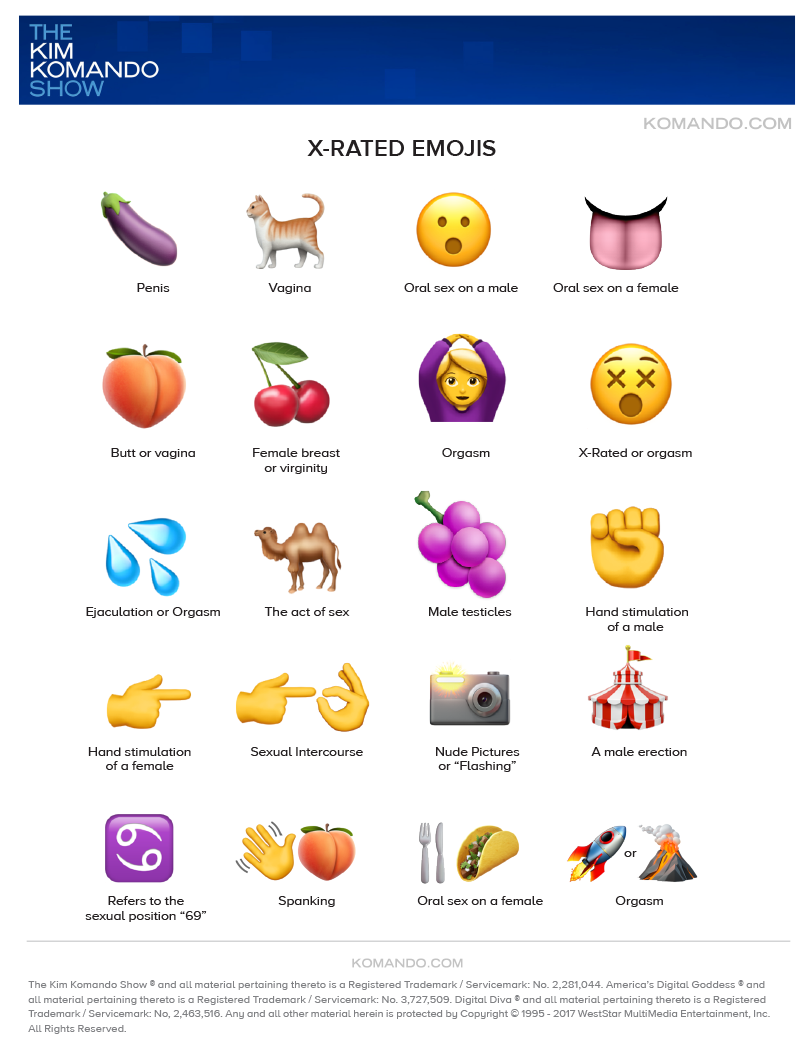
Note: The most commonly emoji currently being used in 2025 by perpetrators is the cheese pizza (aka child porn).
Digital citizenship & online safety
Online safety learning materials
Fun games and videos for kids and teens
- Safe Online Surfing
- NetSmartz Kids: Be Safer Online
- Interland– Google
- No escape room– interactive video for teens*
- NetSmartz videos
- The Internet Safety Coloring & Activity Book: With Olivia and Friends
Tip sheets
- Social media for teens; In Spanish, click here.
- Parent’s guide to smartphone safety; In Spanish, click here.
- Talking to teens about sexting; In Spanish, click here.
- Think before you send; In Spanish, click here.
- Internet safety at home; In Spanish, click here.
Online family pledges
Additional resources for Parents, Educators & Communities
- NCMEC
- Ultimate guide to protecting your child online in 2024– addresses all social media platforms and devices, the current threats to our children (online predators, viewing inappropriate content online, cyberbullying), and provides tips on how to keep them safe.*
- Internet Safety workbook for tweens
- Safety Net Project– understanding technology, how it impacts your child, and learn ways to keep your child safe
- Sextortion prevention videos
- Project Guy, Guardian Ai– website to support parents navigating through the digital world and provides resources to keep their child safe while on-line*
- Best free parental control apps for 2025**
- To learn more about how to protect your teen’s mental health, click here.
Online Safety Settings
Additional resources to help kids and families stay safer online. Please be aware there are videos online of how to turn these settings off, so be sure to check your devices frequently to ensure the settings are always on.
Note- This is not an extensive list. All social media platforms have these options. Please refer to the platforms used on your devices to learn more.